Weather Forecast - Live Radar
- 4.6
- Rating
- 5.00M
- Installs
- Free
- Price
 Analysis by App-foxy
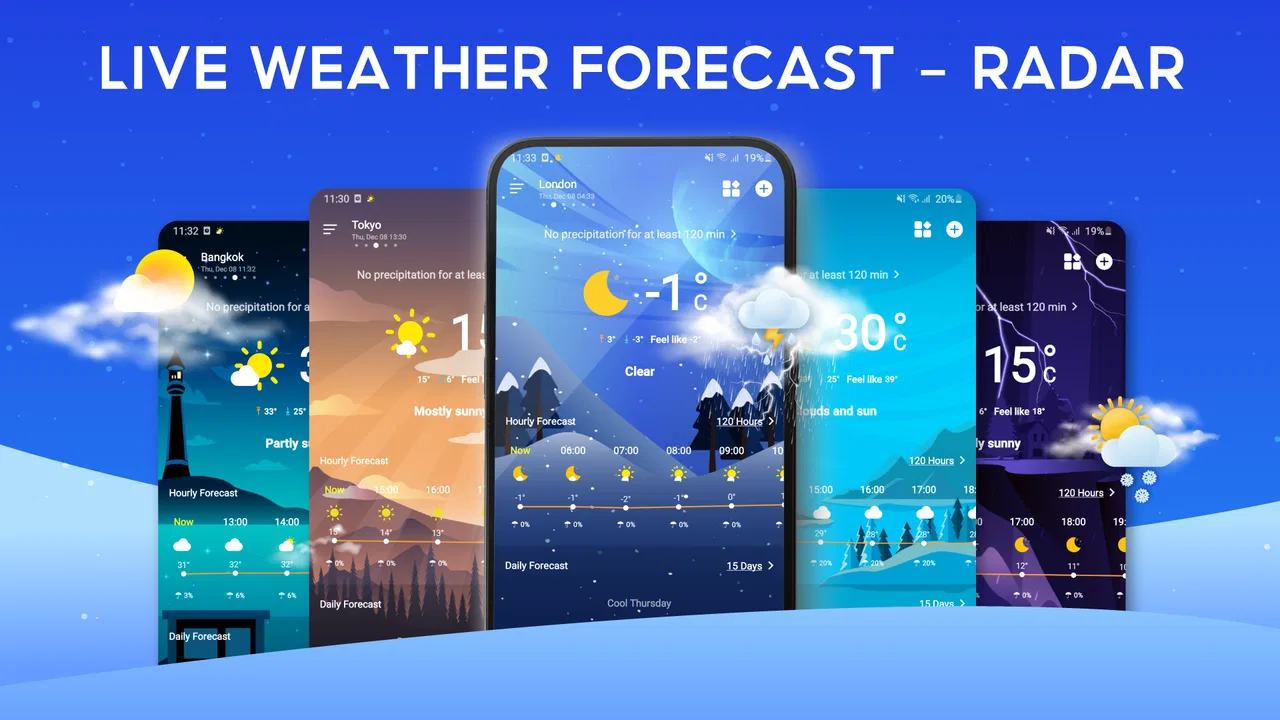
Weather apps are easy to judge when everything works: open one, glance at the temperature, and move on. The real test comes when the forecast looks wrong, the widget stays stale, or the radar view does not match what is happening outside. I spent time using Weather Forecast - Live Radar with that practical standard in mind. It is a free weather app from PlayStudioInc, aimed at people who want local conditions available quickly rather than a complicated meteorology dashboard.
My overall impression is positive, but not uncritical. The app is approachable, supports a quick daily check, and makes sense for users who prefer a dedicated weather screen over searching the web each time. It has reached more than five million installs and holds a 4.6 average from around eighteen thousand ratings, which suggests that its basic approach works for a broad audience. Still, a weather app is only useful when its location, refresh behavior, and presentation are handled correctly. Many frustrations that appear to be forecasting problems actually begin during setup or with the phone itself.
Getting past the first points of friction
I find that the best way to make a weather app easier to use is to build a small, predictable routine around it: check the chosen location, use the main screen for a quick read, and open the radar only when the decision calls for more context. That reduces unnecessary taps and helps separate a display problem from a change in the weather. The next section looks at how those first checks can make everyday use feel less frustrating.
You May Also Like

 Blood Strike: 2.5 Anniversary
Blood Strike’s Loadouts Turn Every Drop Into a Tactical Gamble
A close look at Blood Strike’s custom loadouts: how fast access to signature weapons reshapes its battle royale rhythm, rewards preparation, and narrows the gap between fights.

 Pandora - Music & Podcasts
Pandora’s Music Is Easy to Start, but Harder to Recover
Pandora’s strength is its low-effort path from a seed to a station. Its weak spot is how much confidence it asks you to place in connection, setup, and quiet recovery.

 8 Ball Pool
 Is Built on Rivalries, Rematches, and Routine
A close look at the rivalries, rematches, shared routines, and unanswered safety questions that turn a quick pool match into a persistent mobile community.

 Samsung Music
’s Quiet Strength Is Playing What You Already Own
Its reach comes less from spectacle than from dependable access to a personal library. That simplicity is both the app’s strongest retention engine and its ceiling.

 AccuWeather: Weather Radar
AccuWeather Review: A Quick, Clear Forecast for Everyday Decisions
For everyday plans, the best forecast is the one you can understand quickly. AccuWeather makes rain timing, radar, and local conditions easy to act on, with a few trade-offs.

 Hill Climb Racing
Why Hill Climb Racing Still Turns Crashes Into One More Run
A tiny car, a bumpy hill and one more upgrade: Hill Climb Racing keeps resurfacing because its simple chaos makes every near-miss feel personal.
More From Our News Desk



Why the first forecast may feel incomplete
The first place I would look when the app seems unhelpful is the initial location setup. A weather forecast is only as useful as the place attached to it. If the app is showing a broad nearby area, an old location, or a manually selected city that is not where you currently are, the forecast can appear inaccurate even when the underlying information is reasonable. I found it better to pause at the beginning and make sure the displayed location is the one I actually want to monitor.
This matters especially for people living between towns, commuting across a metropolitan area, or spending weekends somewhere different. A forecast for a city center can differ noticeably from conditions in a rural edge, coastal area, or higher elevation. I would not treat a single displayed location as a perfect description of every place within driving distance. Instead, I use the app for the specific location that matters most during the day and change that focus when my routine changes.
Another common sticking point is expecting a weather screen to behave like a live conversation with the sky. Forecast information is updated, but the weather outside can change between refreshes. A sudden shower can arrive after the last update, while a radar image may show nearby precipitation that never reaches your street. A forecast is guidance, not a guarantee for your exact doorstep. That distinction helps prevent overreacting to small differences between the screen and the window.
Setup checks that save time later
My preferred setup is deliberately simple. I first select the location I care about most, then check whether the main screen is presenting current conditions rather than an old glance from earlier. I also spend a moment looking at the widget, if I choose to use one, instead of assuming its appearance tells me everything. A widget is useful for speed, but the full app is the better place to inspect more context before making a decision about travel, clothing, or outdoor plans.
Widgets can also create misleading impressions when the phone has restricted background activity or when the home screen has not refreshed yet. I would not immediately uninstall the app because a widget appears unchanged. Opening the app directly is a sensible first test. If the full screen updates while the widget does not, the problem is probably the widget refresh path, the phone's power management, or the launcher rather than the forecast itself.
The same approach applies to location. If the app shows the wrong place, I would check the phone's location setting and confirm that the selected city has not been left behind from a previous trip. I would also avoid switching between several location methods at once while diagnosing the issue. Changing one setting, reopening the app, and checking the result makes it much easier to see what helped.
Weather Forecast - Live Radar is designed for Everyone, and I think that broad age rating fits its straightforward purpose. You do not need specialist knowledge to read the main information. However, simplicity does not remove the need to understand what each screen represents. A radar view is not the same as a long-range forecast, and a current temperature is not a promise about the next few hours. Learning that small distinction is more valuable than searching for a hidden setting.
Recovering a broken daily workflow
My normal routine with the app is quick: I check the current conditions before leaving, look at the upcoming outlook when the day involves outdoor time, and use the radar view when rain appears possible. This keeps the app in its proper role. I am not constantly refreshing it, and I do not use one screen as if it answered every weather question.
When that routine breaks, I recover in stages. First, I open the app directly instead of relying on a widget. Next, I confirm the location. Then I give the screen a moment to load before deciding that information is missing. If the display still looks stale, I close and reopen the app and check the phone's internet connection. These are ordinary steps, but they prevent a surprisingly common mistake: changing several things at once and then not knowing which action fixed the problem.
If a radar image looks confusing, I zoom out mentally before zooming in on the map. A colored patch near the location does not automatically mean heavy rain is falling there. It may be moving toward the area, moving away, or weakening before arrival. I use the radar as a visual clue about movement and nearby activity, then compare it with what I can see outside. This is one of the most useful habits I developed while using the app because it avoids treating a map as an exact street-level prediction.
There is also a practical battery trade-off. Checking a weather screen occasionally is light work for most phones, but constantly reopening an app or repeatedly refreshing any live information is unnecessary. I prefer the widget for a quick glance and the full app when I need to investigate. That workflow gives me convenience without turning a simple forecast check into a repeated troubleshooting exercise.
When the app is not the real cause
Some apparent failures are caused by the phone, the network, or the weather itself. If the app cannot update while other services also struggle, I would test the connection before blaming PlayStudioInc's software. A weak signal can leave a screen looking old or incomplete. Moving to a reliable connection and reopening the app is a more useful test than repeatedly tapping the same control.
Phone settings can create another layer of confusion. Battery-saving tools may limit background updates, while a launcher may delay widget changes. A device that has not been restarted for a long time can also behave oddly with location or home-screen components. My general troubleshooting order is therefore conservative: check the connection, open the app directly, verify the location, restart the phone if necessary, and only then consider reinstalling or changing more advanced settings.
Forecast accuracy itself needs a fair test. I would not decide that the app is unreliable because one brief shower was missed or because the temperature differs slightly from a nearby thermometer. Local geography, timing, and rapidly changing conditions all matter. For a serious decision such as a long hike, a flight connection, or hazardous weather, I would consult an official local warning source as well. This app is convenient for everyday awareness, but convenience should not replace authoritative emergency information.
The radar feature is particularly easy to overinterpret. Radar coverage and update timing can make a storm appear more precise than it really is. If the display shows precipitation close to me but the sky remains clear, I wait and compare the movement rather than assuming the app has failed. Conversely, clear radar space does not guarantee that every cloud or shower is represented perfectly. The right question is not “Is this map infallible?” but “Does this map help me make a better short-term decision?” In my experience, it often does.
What the app does well in ordinary life
The strongest use case is the small decision that happens several times a day. Before cycling to work, I can check whether current conditions look comfortable and whether the near-term outlook deserves caution. Before taking a child to a park, I can look beyond the temperature and consider whether rain is approaching. Before hanging laundry outside, I can use the radar view as an extra clue instead of relying only on the morning forecast.
That last example shows the app's practical value. If I see a band of rain nearby, I do not need a detailed meteorological explanation; I need to know whether waiting a little is sensible. The combination of a quick main screen, local forecast information, and radar-style context is more useful for that decision than a plain temperature number. It turns a vague question into a simple check: what is happening now, what appears to be approaching, and how cautious should I be?
I also like the separation between quick access and deeper checking. The widget can reduce the number of steps for a routine glance, while the full app gives me a better place to investigate when the day is uncertain. This is a non-obvious strength because many people judge a weather app only by its opening screen. In practice, the best setup is often a combination: widget for speed, full view for context, and personal observation for confirmation.
Another useful trade-off is that the app does not require me to turn every weather check into a research project. People who want a simple answer will probably appreciate that. On the other hand, users who want extensive historical charts, specialized atmospheric information, or professional planning tools may find the experience too limited. I would choose a more specialized service for detailed aviation, marine, agricultural, or emergency planning rather than expecting this app to cover those needs.
Where it compares well, and where alternatives win
Compared with checking a search engine, this app feels more focused. I do not have to type a city name every time, and the widget can put weather information where I already look. Compared with a phone's built-in weather panel, its appeal depends on whether I prefer this app's layout and radar-oriented workflow. The built-in option may be enough for someone who wants only a temperature and a basic outlook, while this app makes more sense for someone who actively checks nearby precipitation.
Compared with highly detailed weather services, Weather Forecast - Live Radar is easier to approach but less suited to expert analysis. That is not necessarily a flaw. I would rather use a readable tool consistently than a technically dense one that I open only when conditions are already difficult. The important question is whether the app gives me enough information for my own decisions. For commuting, errands, casual outdoor plans, and everyday awareness, I think it generally does.
There is also a cost consideration. The app is free to install, but it includes in-app purchases ranging from $2.99 to $24.99 per item. I would start with the free experience and decide only afterward whether any paid option genuinely improves my routine. A person who wants a completely purchase-free weather tool should inspect the available screens before committing to the app as a long-term favorite. Someone comfortable with optional spending may find the free starting point convenient, but I would not pay simply because the app has a radar label.
The current version is 2.6.7, and the app supports devices running Android 6.0 or later. That makes it accessible to people using older Android phones, although real-world smoothness can still depend on the device, launcher, connection, and system settings. I would keep those factors in mind when judging a widget or refresh issue. A phone that is heavily restricted or running low on storage may make any live information app feel less dependable.
Who should use it and who should skip it
I would recommend this app to someone who wants a dedicated, easy-to-read weather companion with quick local checks and radar context. It is a good fit for commuters, parents planning short outings, casual walkers, and anyone who regularly asks whether rain is approaching. The free entry point makes it easy to try without making an immediate commitment, and the Everyone rating reinforces its accessible presentation.
I would be more cautious about recommending it to someone who needs official alerts as their only safety source, detailed scientific analysis, or highly specialized forecasts. I would also suggest skipping it if the built-in weather tool already gives you everything you need and you dislike maintaining another app or widget. Installing a second weather app is not automatically an improvement; it becomes worthwhile when the location workflow, radar view, or quick access genuinely fits your habits better.
For users who travel often, I would treat location management as part of the experience rather than an afterthought. Before leaving home, check which place is active. After arriving somewhere new, verify it again instead of assuming the app has selected the correct area. This small habit prevents one of the most frustrating errors: making a decision based on yesterday's location while believing the forecast is current.
My practical verdict after using it
Weather Forecast - Live Radar succeeds because it focuses on a common need without demanding much effort. I found its best value in the combination of quick access and a radar view that adds context when rain is nearby. It is not a substitute for official warnings, specialized forecasting, or careful judgment during dangerous conditions, and it can feel less useful when location or widget updates are not configured properly.
My advice is to set one dependable location, test the full app before trusting the widget, and use radar as an indication of movement rather than an exact promise. If the screen looks stale, troubleshoot the connection, phone settings, and active location before concluding that the forecast engine is at fault. Those checks make the experience considerably smoother.
PlayStudioInc has made a weather app that I can see recommending to a friend who wants practical information without a steep learning curve. I would tell that friend to try the free version first, keep expectations realistic, and judge it by whether it improves everyday decisions. For that purpose, it is a useful and approachable choice; for specialist or safety-critical forecasting, I would pair it with a more authoritative source.
FAQs for Weather Forecast - Live Radar
01What features does Weather Forecast - Live Radar offer?
Weather Forecast - Live Radar provides real-time updates, detailed forecasts, and interactive radar maps. It includes features like severe weather alerts, a 7-day outlook, and customizable widgets. Users can track storms, view precipitation patterns, and access weather conditions for any location worldwide. The app also offers air quality and UV index information.
02How accurate is the weather information provided by the app?
Weather Forecast - Live Radar utilizes data from multiple reliable sources, ensuring high accuracy in its predictions. The app updates frequently to provide the latest weather information, including changes in temperature, precipitation, and wind conditions. Users report a high level of satisfaction with the app’s precision and reliability in forecasting.
03Is Weather Forecast - Live Radar free to use?
The app offers a free version with essential features, but also includes a premium subscription for users seeking an ad-free experience and additional functionalities. The premium version provides enhanced features such as advanced radar options and longer-term forecasts. Users can choose based on their needs and budget.
04Does the app require an internet connection to function?
Yes, Weather Forecast - Live Radar requires an internet connection to deliver real-time updates and accurate forecasts. While some basic features may be available offline, such as previously downloaded forecasts, most functionalities, including live radar and alerts, need an active connection to provide up-to-date information.
05How does the app handle privacy and data security?
Weather Forecast - Live Radar is committed to user privacy, employing robust security measures to protect personal data. The app collects location information to provide accurate forecasts, but it does not share this data with third parties without user consent. Users can adjust privacy settings to control data usage and permissions.
Pros
- Accurate real-time weather updates.
- User-friendly interface and design.
- Detailed hourly and weekly forecasts.
- Customizable weather alerts.
- Interactive radar maps available.
Cons
- Contains ads in the free version.
- Requires internet for live updates.
- Limited features without upgrade.
- Notifications can be overwhelming.
- Heavy battery usage during updates.

Weather Forecast - Live Radar
Gallery